
미디어 유형
개요
미디어 유형은 Zabbix에서 알림과 경고를 전송하는 데 사용되는 전달 채널입니다.
미디어 유형은 다음 전달 방법을 지원합니다:
Alerts > Media types에서 미디어 유형을 관리합니다. 일부 미디어 유형은 기본 데이터셋에 미리 정의되어 있습니다. 작동시키려면 매개변수만 미세 조정하면 됩니다.
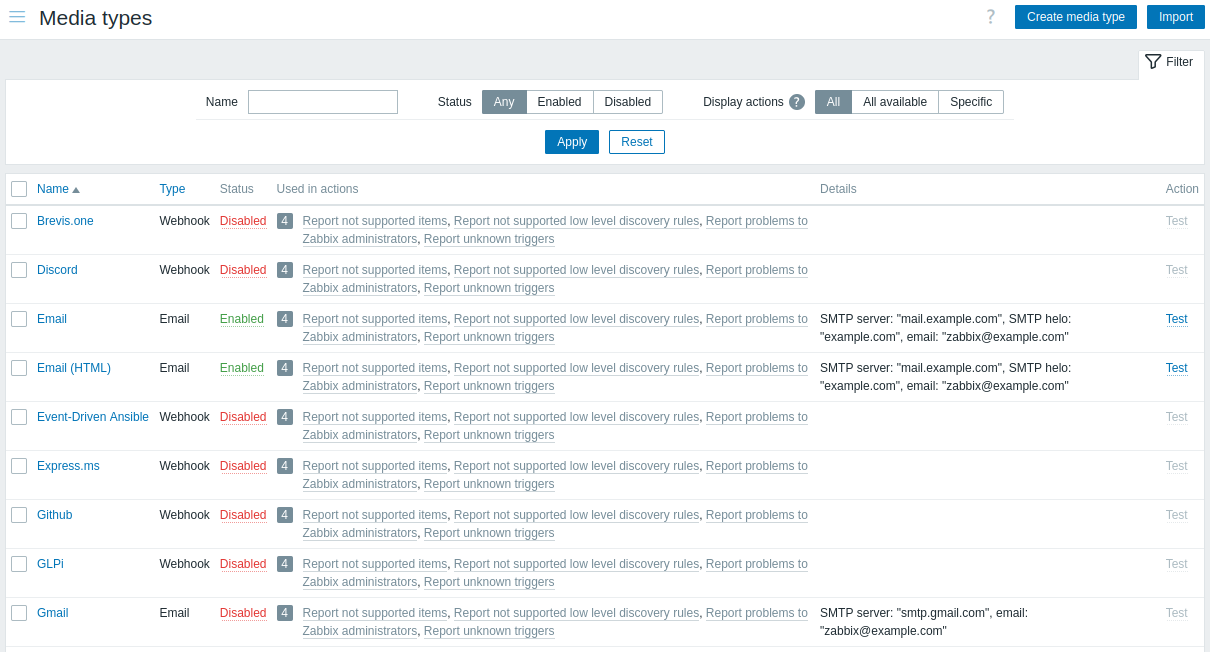
미디어 유형이 알림 프로세스 내에서 어떻게 맞물리는지 보기 위해, Zabbix에서 최종 사용자에게 알림을 전달하기 위한 세 가지 요구 사항을 살펴보겠습니다:
- 알림을 전송하는 액션 오퍼레이션(operation)이 정의되어 있어야 합니다
- 작동하는 미디어 유형이 정의되어 있어야 합니다 (SMTP를 사용해 경고를 전송하는 Email 등)
- 사용자 수준의 전달 세부 정보(이메일 주소, 전화번호 등)가 사용자 미디어에 정의되어 있어야 합니다
미디어 유형 테스트
구성된 미디어 유형이 작동하는지 테스트하려면 미디어 유형 목록에서 Test를 클릭하십시오.
테스트 요청은 Zabbix server로 전송됩니다. Zabbix server는 지정된 미디어 유형을 사용해 경고 전송을 시도하고 결과를 프론트엔드로 반환합니다. 프론트엔드는 server가 결과를 반환할 때까지 대기합니다. 미디어 유형 테스트는 기본적으로 65초의 타임아웃을 가지며 (Administration > General > Timeouts에서 설정 가능),
다음 항목에 대한 테스트 세부 정보도 참고하십시오:
구성
Zabbix 프론트엔드에서 미디어 유형을 생성하려면:
- 이동: Alerts > Media types
- Create media type 클릭
- 폼에서 미디어 유형의 매개변수 입력
일부 매개변수는 모든 전달 방법에 공통입니다.
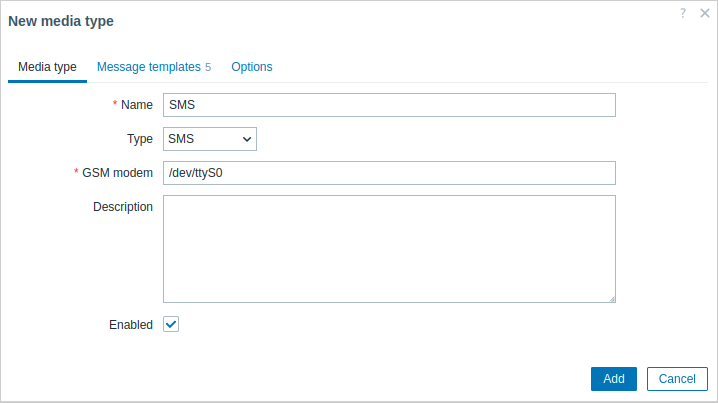
| 매개변수 | 설명 |
|---|---|
| Name | 미디어 유형의 이름입니다. |
| Type | 미디어 유형의 전달 방법을 선택합니다. |
| Description | 미디어 유형에 대한 설명을 입력합니다. |
| Enabled | 미디어 유형을 활성화하려면 체크박스를 표시합니다. |
방법별 매개변수는 email, SMS, custom alertscript, 또는 webhook 페이지를 참고하십시오.
메시지 템플릿
Message templates 탭에는 이벤트 유형별(문제, 문제 복구, 검색 등) 기본 메시지가 포함되어 있습니다.
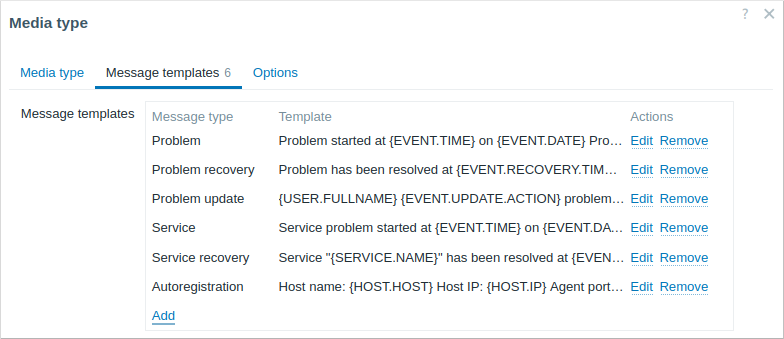
기본 메시지를 정의하려면 Add를 클릭합니다(기존 메시지를 업데이트하려면 Edit):
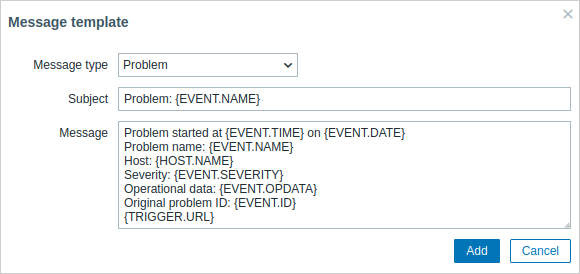
| 매개변수 | 설명 |
|---|---|
| Message type | 기본 메시지를 사용할 이벤트 유형입니다. 각 이벤트 유형마다 하나의 기본 메시지만 정의할 수 있습니다. |
| Subject | 기본 메시지의 제목입니다. 제목에는 매크로가 포함될 수 있습니다. 255자로 제한됩니다. SMS 미디어 유형에서는 Subject를 사용할 수 없습니다. |
| Message | 기본 메시지입니다. 데이터베이스 유형에 따라 일정 문자 수로 제한됩니다(자세한 내용은 메시지 전송 참고). 메시지에는 지원되는 매크로가 포함될 수 있습니다. 문제 및 문제 업데이트 메시지에서는 표현식 매크로가 지원됩니다(예: {?avg(/host/key,1h)}). |
액션 오퍼레이션에 사용자 지정 메시지가 정의된 경우, 기본 메시지는 해당 메시지로 재정의됨에 유의하십시오.
메시지 템플릿 정의는 알림에 기본 메시지를 사용하지 않는 webhook이나 사용자 지정 alert 스크립트를 포함하여 모든 전달 방법에서 필수입니다. 예를 들어, Pushover webhook에 문제 메시지가 정의되어 있지 않으면 "Send message to Pushover webhook" 액션은 문제 알림을 전송하지 못합니다.
옵션
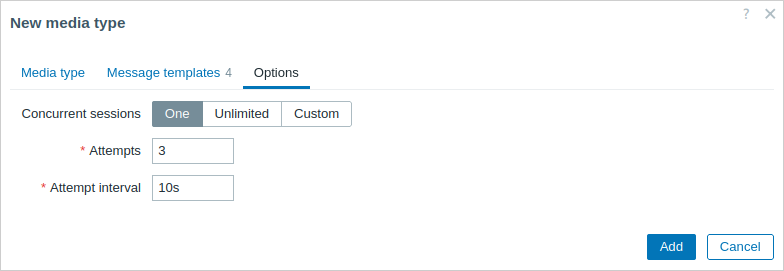
Options 탭에는 알림 처리 설정이 포함되어 있습니다. 동일한 옵션 세트가 각 미디어 유형에 대해 구성 가능합니다.
모든 미디어 유형은 병렬로 처리됩니다. 동시 세션의 최대 개수는 미디어 유형별로 구성 가능하지만, server의 전체 alerter 프로세스 수는 StartAlerters 매개변수에 의해서만 제한될 수 있습니다. 하나의 트리거에서 생성된 경고는 순차적으로 처리됩니다. 따라서 여러 알림이 동시에 처리되려면 여러 트리거에서 생성된 경우여야 합니다.
| 매개변수 | 설명 |
|---|---|
| Concurrent sessions | 미디어 유형에 대한 병렬 alerter 세션 수를 선택합니다: One - 세션 1개 Unlimited - 무제한 세션 Custom - 사용자 지정 세션 수 선택 Unlimited/높은 값은 더 많은 병렬 세션과 알림 전송 용량 증가를 의미합니다. Unlimited/높은 값은 동시에 많은 알림을 전송해야 할 수 있는 대규모 환경에서 사용해야 합니다. 전송해야 할 알림 수가 동시 세션 수보다 많으면 나머지 알림은 대기열에 들어가며, 손실되지 않습니다. |
| Attempts | 알림 전송을 시도하는 횟수입니다. 최대 100회까지 지정할 수 있으며 기본값은 '3'입니다. '1'을 지정하면 Zabbix는 알림을 한 번만 전송하고 전송에 실패해도 재시도하지 않습니다. |
| Attempt interval | 전송에 실패한 경우 알림을 재전송하는 빈도이며, 초 단위입니다(0-3600). '0'을 지정하면 Zabbix는 즉시 재시도합니다. 시간 접미사가 지원됩니다(예: 30s, 1m, 1h). |
사용자 미디어
미디어 유형이 알림을 어떻게 전송할지 정의하는 반면, 사용자 미디어는 알림을 어디로 전송해야 하는지 정의합니다.
사용자 미디어(예: 이메일 주소, webhook 사용자 ID 등)는 전달 방법에 관계없이 사용자 프로필에 정의되어야 합니다. webhook X를 사용해 Admin 사용자에게 메시지를 보내는 액션은 Admin 사용자 프로필에 webhook X의 전달 세부 정보가 정의되어 있지 않으면 전달에 실패합니다.
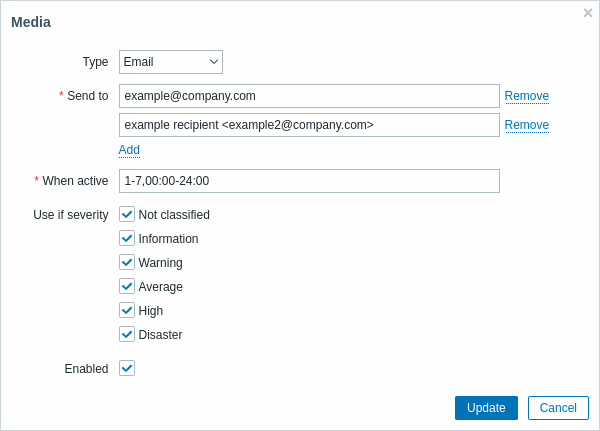
사용자 미디어를 정의하려면:
- Users > Users로 이동하여 사용자 속성 폼을 여십시오(또는 본인 사용자 프로필의 User settings > Notifications로 이동)
- Media 탭에서 Add를 클릭하십시오
| 매개변수 | 설명 |
|---|---|
| Type | 드롭다운 목록에는 활성화된 미디어 유형의 이름이 표시됩니다. 비활성화된 미디어 유형의 미디어를 편집할 때는 유형이 빨간색으로 표시됨에 유의하십시오. |
| Send to | 메시지를 전송할 연락처 정보를 입력합니다. email 미디어 유형의 경우, 주소 입력란 아래의  버튼을 클릭하여 여러 주소를 추가할 수 있습니다. 이 경우 나열된 모든 주소로 알림이 전송됩니다. 주소 예시는 email 미디어 유형의 Email 매개변수 설명을 참고하십시오. 버튼을 클릭하여 여러 주소를 추가할 수 있습니다. 이 경우 나열된 모든 주소로 알림이 전송됩니다. 주소 예시는 email 미디어 유형의 Email 매개변수 설명을 참고하십시오. |
| When active | 메시지가 전송되는 시간을 제한할 수 있습니다. 예를 들어 평일에만 전송하도록 설정할 수 있습니다(1-5,09:00-18:00). 이 제한은 사용자 시간대를 기준으로 함에 유의하십시오. 사용자 시간대가 변경되어 시스템 시간대와 다를 경우, 중요한 메시지를 놓치지 않도록 이 제한을 그에 맞게 조정해야 할 수 있습니다. 형식에 대한 설명은 기간 지정 페이지를 참고하십시오. 사용자 매크로가 지원됩니다. |
| Use if severity | 알림을 받고자 하는 트리거 심각도의 체크박스를 표시하십시오. 참고로, 트리거가 아닌 이벤트에 대한 알림을 받으려면 기본 심각도('Not classified')가 반드시 체크되어 있어야 합니다. 저장 후, 선택된 트리거 심각도는 해당 심각도 색상으로 표시되며, 선택되지 않은 항목은 회색으로 표시됩니다. |
| Status | 사용자 미디어의 상태입니다. Enabled - 사용 중입니다. Disabled - 사용되지 않습니다. |